Using Matrix#
Direct messages#
- Search for a user by display name or full Matrix ID (e.g.
@colleague:eudat.eu) and start a direct chat. - Direct messages are end-to-end encrypted by default.
Rooms and Spaces#
-
Rooms are group chats dedicated to a topic or project. Rooms can be public (findable and joinable via search) or private (invite-only). Encryption can be enabled by room administrators.
-
Spaces are collections of related rooms — think of a Space as a community or project hub.
The public space EUDAT-community is open to everyone. It hosts discussion rooms and shares information, including service announcements. For example, room #service-anouncement:eudat.eu carries announcements about EUDAT services.
Everyday tips#
-
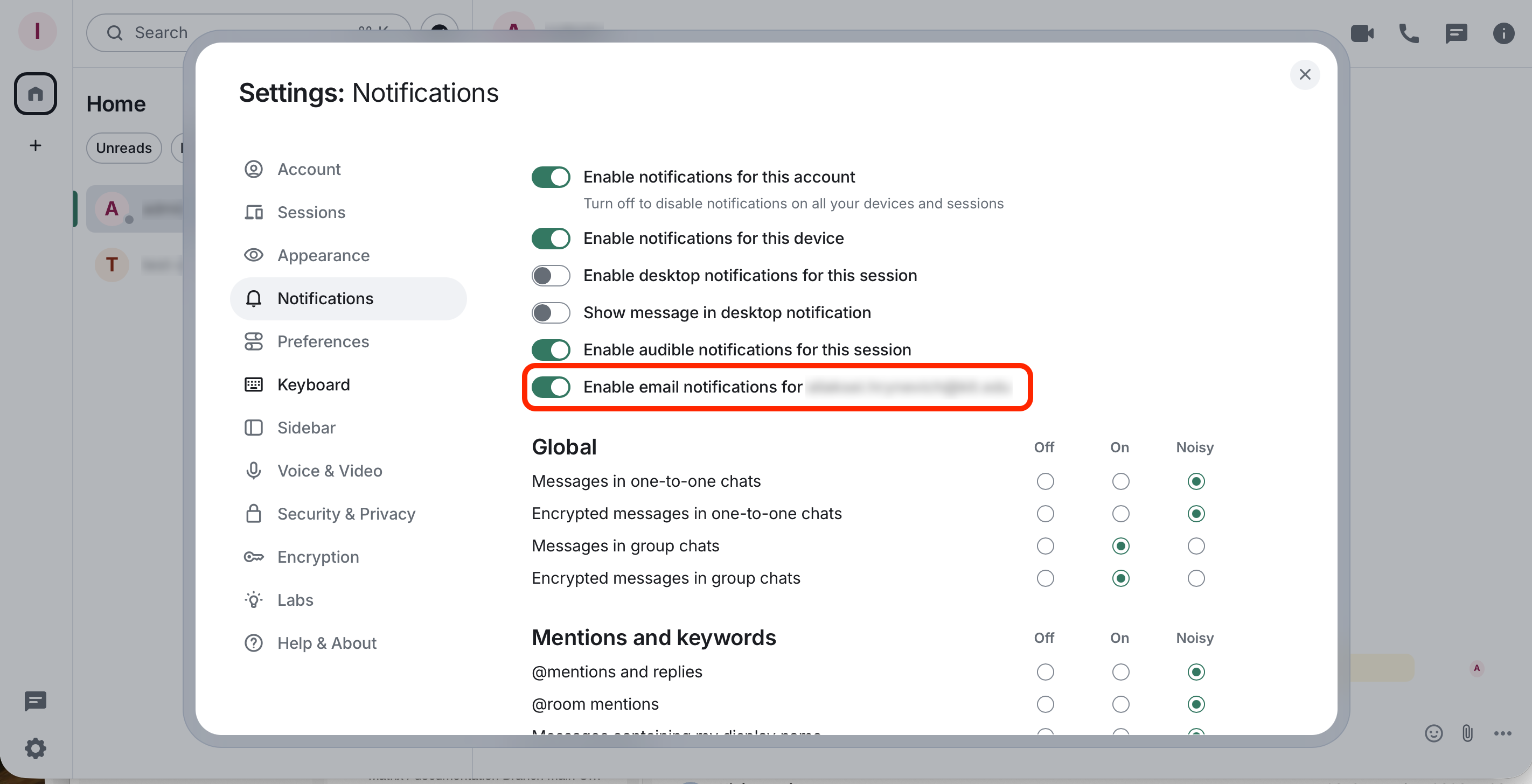
Notifications Settings: Adjust per-room or globally under All settings -> Notifications.
-
Enable Email notifications. The e-mail address should have been set for you in the background and cannot be changed.
-
Multiple devices: Log in on your phone and desktop with the same account; verify each new device when prompted.
- Keep a trusted session: Avoid logging out on a device you trust. Logging out deletes that device’s local encryption keys, and you may lose access to older encrypted messages on it unless you have your recovery key.
- Most clients support only one account at a time. To access multiple accounts use a second browser profile or a private window.
Last update: 07.10.2026
Last review: 07.10.2026