Community settings#
Community Admins and Owners configure the community profile, visibility, submission policies and information pages. A Manager manages membership and curation, but cannot change these settings. These are community roles; they are separate from the B2INST service administrator who can create communities.
Sign in at B2INST, open your community, select Manage
community, then Settings. The settings address is
https://b2inst.gwdg.de/communities/<community-identifier>/settings.
| Settings section | What it controls |
|---|---|
| Profile | Name, description, type, website, organizations and profile picture. |
| Privileges | Community visibility, membership-list visibility and community access to restricted records. |
| Submission policy | Who can submit records and who can publish without community review. |
| Pages | The About page and curation policy. |
The screenshots below show an existing B2INST demonstration community. Names, account details and any demonstration host shown in them are example values.
Profile#
Open Settings > Profile and complete the community’s basic information:
- Name is the displayed community name and is required. It can contain up to 250 characters.
- Short description summarizes the community’s purpose in up to 250 characters. Put longer instructions on the About page.
- Type identifies the kind of community, using the available options.
- Website is a complete URL, such as
https://example.org. - Organizations lists the organizations associated with the community. Search by name and select a result, or add a custom organization.
- Profile picture displays the community’s logo or other identifying image. Use a JPEG or PNG file within the size limit displayed by the uploader.
Click Save for changes to the profile fields. The picture uploader saves the selected image separately.
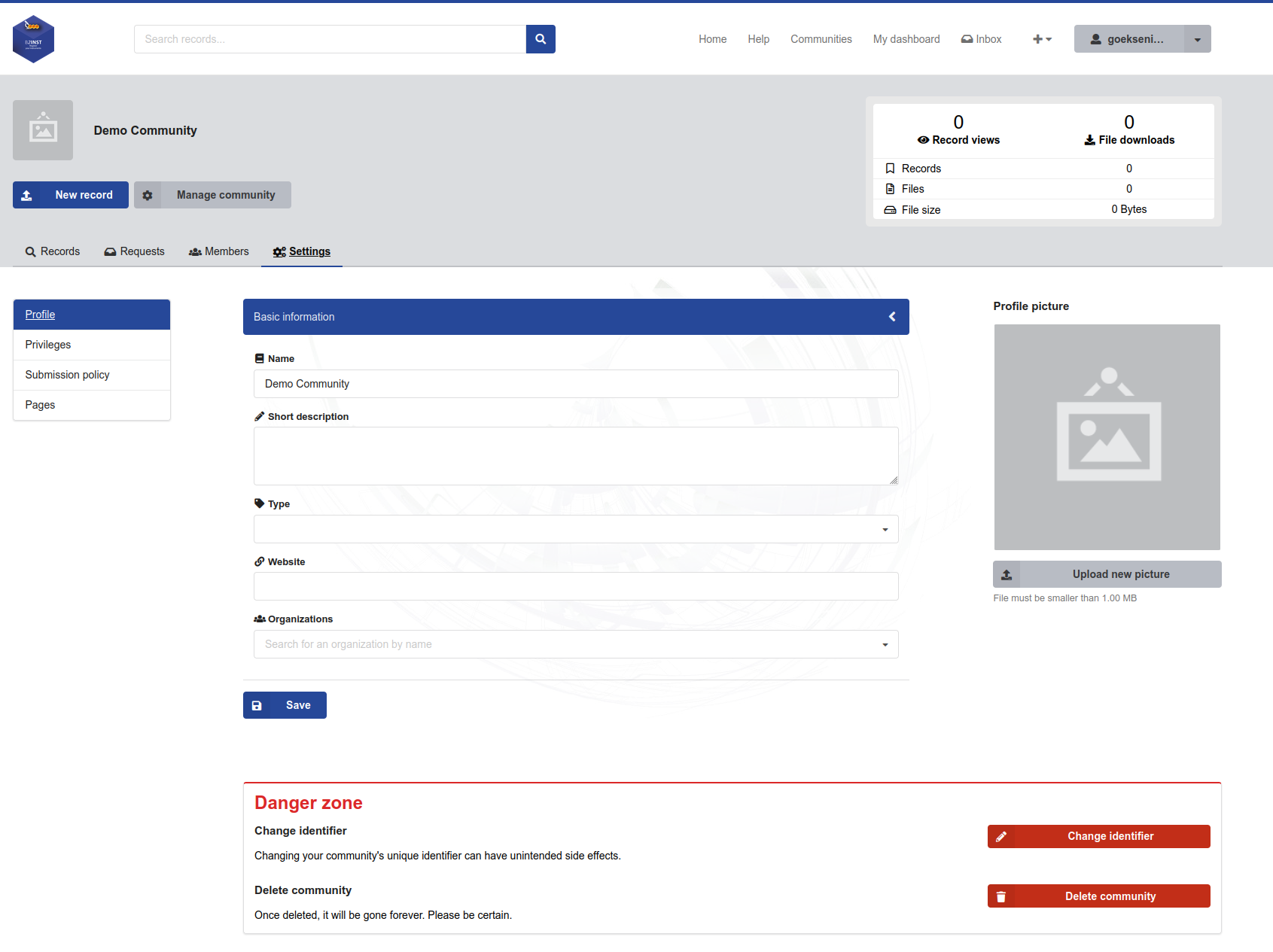
Community profile settings in B2INST. The Owner also sees the identifier and deletion controls below the ordinary profile fields.
Identifier and deletion#
Only a community Owner can use Change identifier or Delete community. An Admin can change the ordinary profile fields but does not have these two permissions. Owner access can be delegated; these actions are not permanently reserved to the service administrator who originally created the community.
The identifier forms part of the community’s URL. Coordinate any change with the people maintaining links, documentation and integrations. Contact B2INST support before deleting a community whose records or memberships are still needed.
Privileges#
Open Settings > Privileges. Community visibility, membership visibility and record access are separate choices. Click Save after changing them.
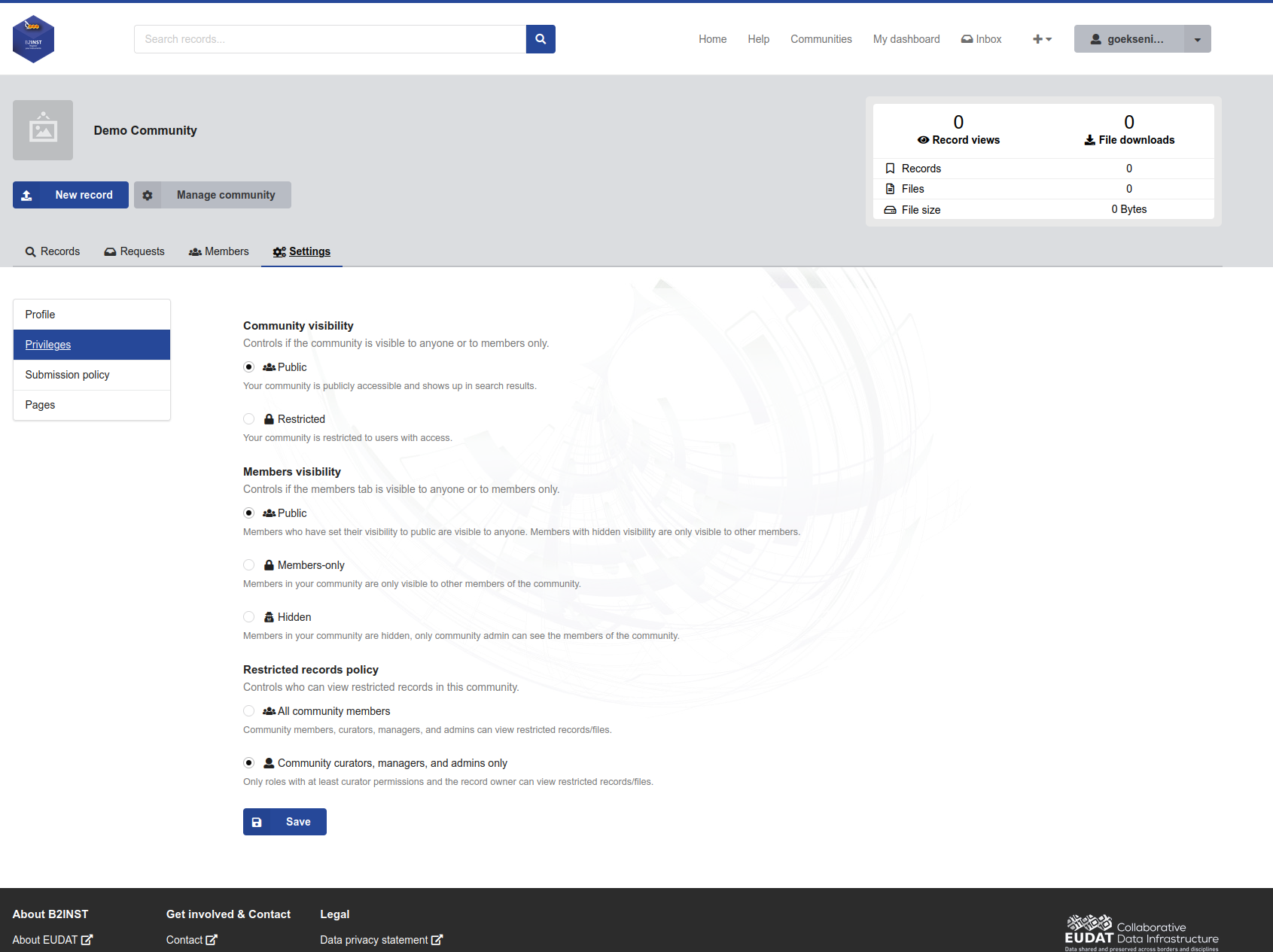
The Privileges page contains three independent groups of settings. The Hidden membership option has the implementation limitation described below.
Community visibility#
| Option | Effect |
|---|---|
| Public | Anyone can open the community page and find it in community search results. |
| Restricted | Access to the community page and its search entry requires community membership, apart from service-level access. |
A restricted community is not a way to make an otherwise public instrument record private. Record metadata and files have their own access settings. An invitation alone does not establish membership: the invited user must accept it.
Members visibility#
This setting controls the membership list, not instrument metadata or file access.
| Option | Behaviour |
|---|---|
| Public | In a public community, visitors can see members whose individual membership visibility is Public. Community members can also see memberships marked Hidden. |
| Members-only | Only community members can access the membership list, apart from service-level access. The API value is restricted. |
| Hidden | Applies additional filtering to the membership list. See the current limitation below before relying on this setting. |
An individual member’s Public or Hidden setting is separate from the community-level option. See Managing members for invitations, roles and individual membership visibility.
Current implementation limitation: The Hidden option’s help text says that only community administrators can see members, but the backend does not enforce that description consistently. Ordinary members can still see themselves and selected privileged roles. With the default backend configuration, Owners see the full list; Admins and Managers are not automatically included in that exception. In a public community, individually Public memberships can also remain visible through the public members endpoint, including to anonymous visitors. Use Members-only when the requirement is to prevent public access to the list, and contact B2INST support if you need an administrator-only list.
B2INST currently disables requests to join a community. Membership is managed through invitations and, where enabled, group membership.
Restricted records policy#
This policy determines which community roles receive access to restricted record metadata or restricted files. Metadata and files are protected separately: a public instrument description can have restricted attachments.
| Option | Community access for a record in this community |
|---|---|
| All community members | Members, Curators, Managers, Admins and Owners can view restricted metadata and files. The API value is open. |
| Community curators, managers, and admins only | Curators, Managers, Admins and Owners can view restricted metadata and files; ordinary Members do not receive access through this policy. The API value is restricted. |
Record ownership, explicit sharing permissions and service permissions can grant access independently. Choosing the second option does not revoke those grants. Neither option changes public metadata or public files into restricted content.
Records in several communities: Do not assume that the most restrictive community policy determines access everywhere. In the current code, individual record and file checks narrow ordinary-member access when any associated community uses the
restrictedpolicy, while search can still include a restricted record through membership in an associated community with theopenpolicy. A search result and the ability to open that record can therefore differ. Before relying on mixed policies, ask B2INST support to verify both search visibility and record/file access for the affected roles.
Submission policy#
Open Settings > Submission policy. Select a review policy and a records submission policy, then click Save. These settings answer different questions: who may submit, and which eligible submitters may bypass community review.
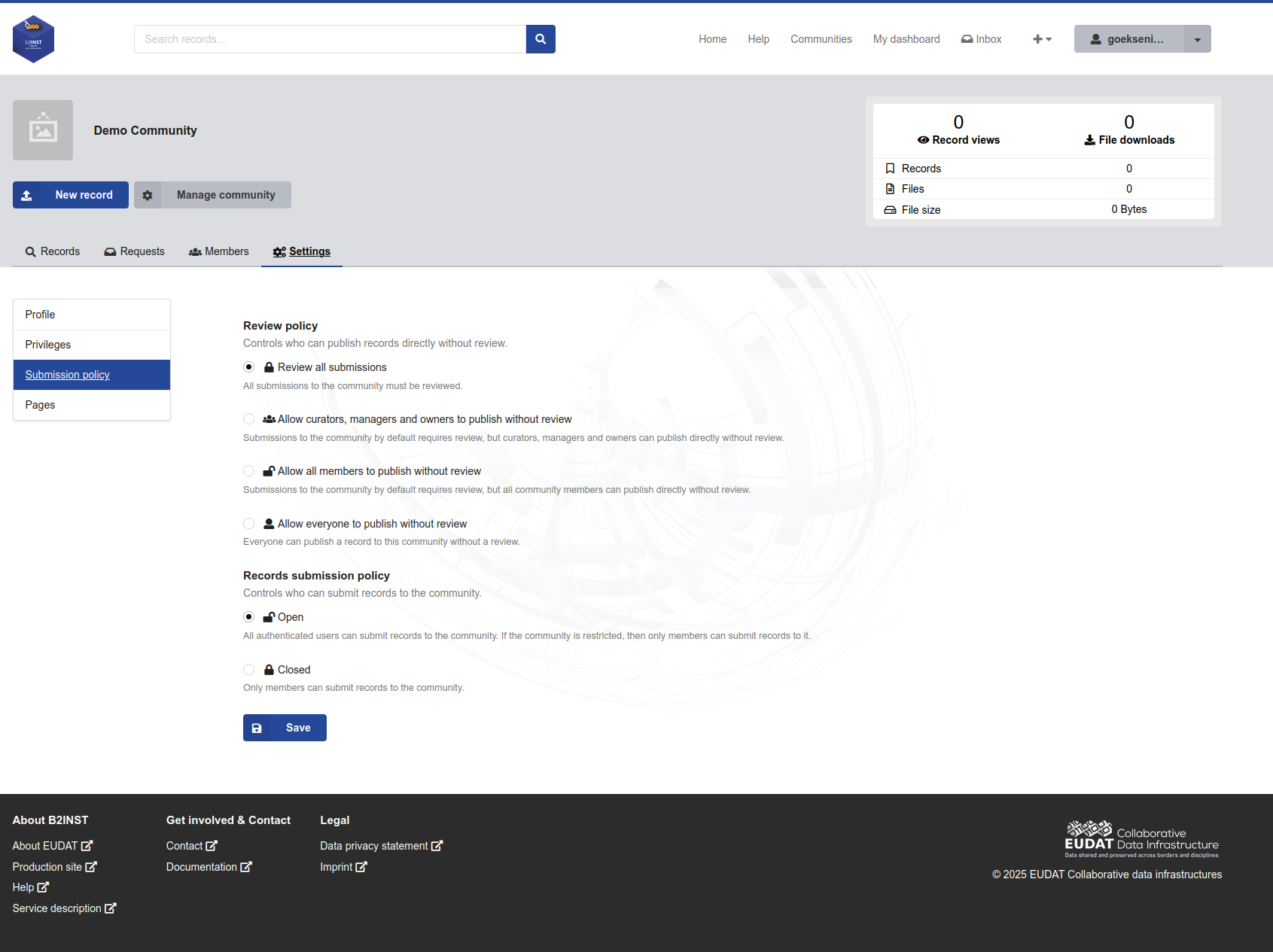
Review policy and records submission policy are configured independently.
Review policy#
| Option shown in B2INST | Who can publish a submission without community review | API value |
|---|---|---|
| Review all submissions | No ordinary submitter; each submission follows community review. | closed |
| Allow curators, managers and owners to publish without review | Community Curators, Managers, Admins and Owners. Admins have curation permission even though the label does not name them. | open |
| Allow all members to publish without review | All community members. Eligible non-members still require review. | members |
| Allow everyone to publish without review | Any authenticated user who is allowed to submit to the community. | all |
Here, Owners means the community’s Owner role. Owning the instrument record
does not by itself grant the curator-level review exemption. The values in this
table belong to access.review_policy; in particular, open means the
curator-or-higher option, not unrestricted submission without review.
The policy governs submission and inclusion in a community. It is not a promise that every later edit of an already accepted record creates a new review request. See the user guide for editing published instrument records.
Records submission policy#
| Option | Who may submit |
|---|---|
| Open | Any authenticated user when the community is Public. A Restricted community still requires membership. |
| Closed | Community members only, regardless of whether the community itself is Public or Restricted. |
The API field is access.record_submission_policy, with values open or
closed. Closed does not prevent existing members from submitting. The
Allow everyone to publish without review setting does not override this
submission policy or a Restricted community’s membership requirement.
Combining the settings#
| Intended workflow | Community visibility | Records submission policy | Review policy |
|---|---|---|---|
| Accept instrument proposals from any signed-in user and review each one | Public | Open | Review all submissions |
| Let members contribute, with every submission reviewed | Public or Restricted | Closed | Review all submissions |
| Let members publish directly and review proposals from outsiders | Public | Open | Allow all members to publish without review |
| Let only members contribute and publish directly | Public or Restricted | Closed | Allow all members to publish without review |
New communities default to Public community visibility, Public members visibility, curator-or-higher restricted-record access, Open record submission and Review all submissions, unless a different initial visibility or policy is supplied during setup. Existing communities retain their saved policies.
Pages#
Use Settings > Pages for longer information:
- Curation policy explains which instruments belong in the community, required metadata, any required attachments, and the review criteria.
- About page describes the community, its facilities or project, contact details and useful links.
Expand the relevant section, edit the rich text, and click Save. Each field allows up to 50,000 characters. These pages describe the community’s requirements; writing a requirement here does not automatically add validation to the record form. Use metadata schema extensions for supported community-specific instrument fields and validation rules.
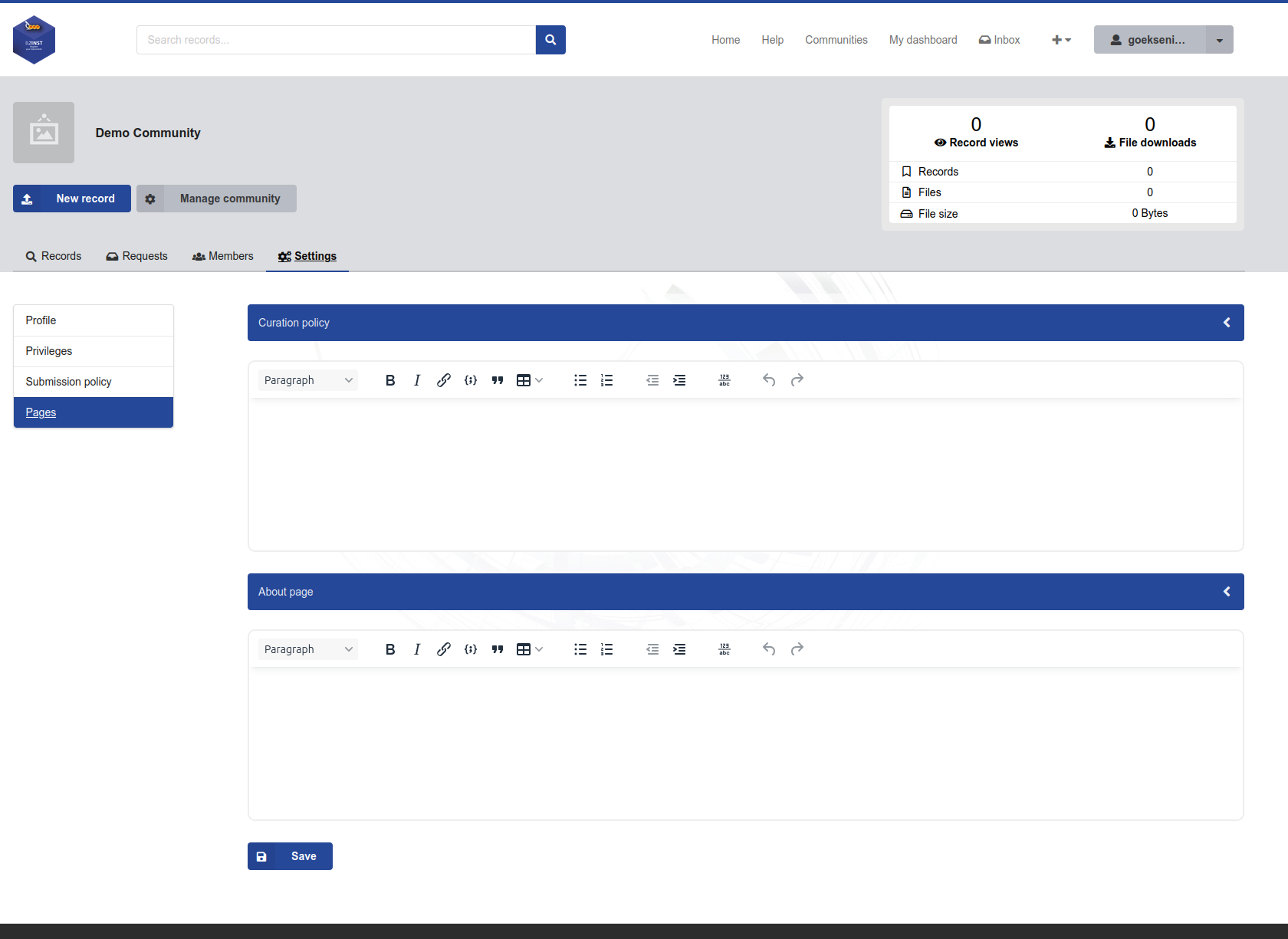
The Pages settings provide separate editors for the curation policy and About page.
For a complete illustrated sequence, see Creating and managing a B2INST community. For responsibilities and role delegation, see Community administrators.
Last update : 04.10.2026
Last review : 04.10.2026